A collection endpoint can create or retrieve a list of items using either POST or GET methods and follows the naming convention of
/o/c/{objectPlural}. GET endpoints return a paginated list of items. The caller can specify the page number and the page size (number of elements). GET endpoints also offer the common refinement options search,
filter and
sort to target responses and leave out unnecessary data. Responses can be returned as JSON (default) or XML. JSON is preferable because it’s easier to process.
Batch Operations
POST /o/c/{objectPlural}/batch (bulk create)
PUT /o/c/{objectPlural}/batch (bulk replace)
DELETE /o/c/{objectPlural}/batch (bulk delete)
These endpoints accept JSON arrays and return a task payload you can check for execution status. While the Object’s collections endpoint can achieve a similar outcome, the process is not optimized for large operations.
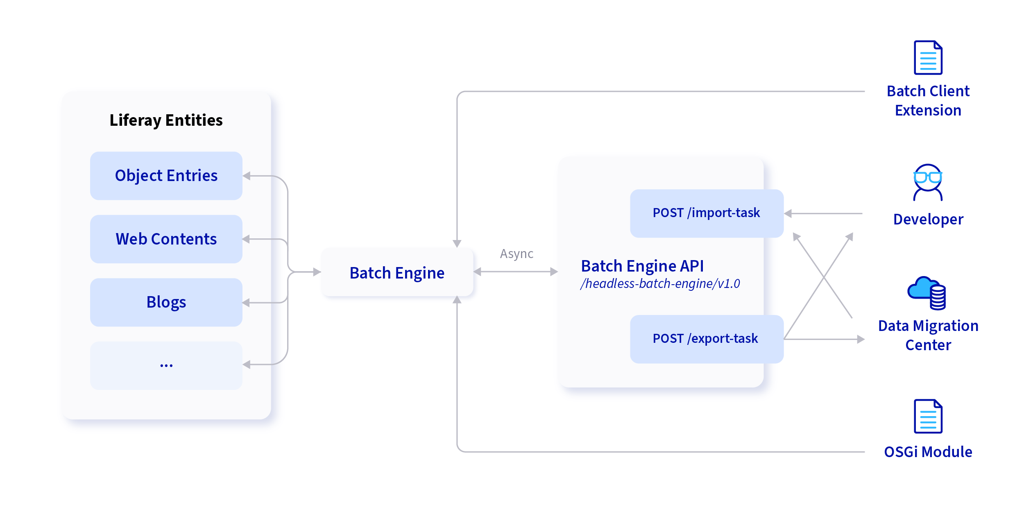
Unlike the collections or single resource calls, batch calls are executed asynchronously. Rather than holding a connection until the operation completes, the request is processed on a separate thread, creating a non-blocking user experience. To maximize performance, use the batch endpoints whenever users can operate on more than one record at a time.
Once you know the endpoint, consider the request itself. This is where you refine the query and data to squeeze every bit of performance out of your application. Liferay’s headless API offers query parameters that are supported by most endpoints.
Most list endpoints support:
-
page and pageSize for pagination;
-
search for keyword search;
-
filter using OData-style filtering (eq, ne, gt, ge, lt, le, and, or, contains, startswith);
-
sort=field:asc|desc to sort the returned items;
-
fields to return only specific fields;
-
nestedFields to include additional nested data for Objects: permissions, file content in Base64 format, audit events, and related entries (withnestedFieldsDepth to control levels).
It’s important to know about and implement these during development, even though you’re often working with smaller data sets and won’t benefit as much from performance-enhancing options.
By default, the collections GET endpoint will return the whole object, with all its top level attributes. By contrast, consider Clarity’s distributors table. It doesn't list every attribute of the distributors, just the subset it’s using. Otherwise, dozens upon dozens of fields would be collected, serialized, sent back with the payload, and then deserialized, despite never being used. Instead, specify in the query only the fields you plan to render. When considering production-level data and loads, the benefits from small improvements like this compound. Reducing a single response by 90% across 5000 concurrent users, for example, would mean a huge difference in the amount of data transferred and the processing used to create those responses.
GraphQL Counterpart
The GraphQL endpoint is a single URL (/o/graphql) where you use queries and mutations to achieve the same CRUD and filtering goals with precise field selection. It’s great for fetching nested data in one round trip. However, you can also fetch nested fields with REST calls by specifying the nestedFields query parameter. If you know GraphQL well, feel free to use it, but Liferay provides the same functionality through its REST endpoints.
Defensive programming is an important strategy for building stable applications. You can think of calls to the headless API being in one of three states. Which state it’s in dictates the behavior of your UI, which should clearly indicate what’s happening to the user.
| State |
Description / Behavior |
| loading |
|
| success |
|
| error |
-
Render user-friendly error messages
-
Include the system error code, so it can be reported to the solution team for diagnosis
-
Provide a retry option when applicable
|
As a best practice, applications should normalize the returns from the fetch layer with an object like { data, error }. This way, any function calling the fetch layer has a predictable response and offers the opportunity to reuse response processing and error handling. This lowers maintenance costs and complexity.
This strategy for handling statuses works well with Liferay Headless APIs:
-
2xx: Map API fields to your view model before setting state.
-
400/422 (validation): Show field-level messages close to inputs; keep the user’s draft intact.
-
401/403 (auth): Trigger re-login/refresh and retry once.
-
404: Show an empty state (“This record no longer exists”) and offer navigation back.
-
409 (conflict): Re-fetch the item and prompt the user to reconcile changes.
-
429 (rate limit): Respect Retry-After if present; back off exponentially.
-
5xx: Show a generic error, log details, and (optionally) provide a Retry button.
If they are made made generic, the error codes don't require handling for every action in the application. Whether you handle one or all of the codes, build the error handling so it doesn't break the user experience, but provides enough insights to the development team so that they can diagnose and fix issues in a timely manner.
With the previous lesson’s Authorization Code + PKCE in place, your application can call endpoints that are used to retrieve the Distributor data using a Bearer token.
Well-structured APIs with refinement options, bulk options, and the ability to return nested data are essential for frontend applications. By calling the proper endpoint with the proper parameters and request body, and handling error codes gracefully, your application is well on its way to seamless backend-frontend integration.
Next, you’ll update Clarity’s distributor application with functions to fetch data, and integrate them into the custom elements responsible for its display.