Error "Invalid site key" when using reCAPTCHA v3

Written By
Jamilly Macedo
How To articles are not official guidelines or officially supported documentation. They are community-contributed content and may not always reflect the latest updates to Liferay DXP. We welcome your feedback to improve How To articles!
While we make every effort to ensure this Knowledge Base is accurate, it may not always reflect the most recent updates or official guidelines.We appreciate your understanding and encourage you to reach out with any feedback or concerns.
Legacy Article
You are viewing an article from our legacy "FastTrack"
publication program, made available for informational purposes. Articles
in this program were published without a requirement for independent
editing or verification and are provided"as is" without
guarantee.
Before using any information from this article, independently verify its
suitability for your situation and project.
Issue
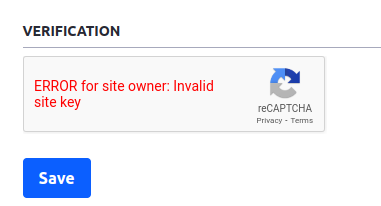
- When configuring reCAPTCHA v3 and testing it on the "Forgot Password" page, the following error message is reported:
"ERROR for site owner: Invalid site key".
Resolution
- Liferay does not currently support reCAPTCHA v3.
- To solve the issue, configure reCAPTCHA v2 in your project.
Did this article resolve your issue ?


