Why do I see Groovy as the only script language for Kaleo Workflow Designer in Liferay DXP?
How To articles are not official guidelines or officially supported documentation. They are community-contributed content and may not always reflect the latest updates to Liferay DXP. We welcome your feedback to improve How To articles!
While we make every effort to ensure this Knowledge Base is accurate, it may not always reflect the most recent updates or official guidelines.We appreciate your understanding and encourage you to reach out with any feedback or concerns.
legacy-article
learn-legacy-article-disclaimer-text
Issue
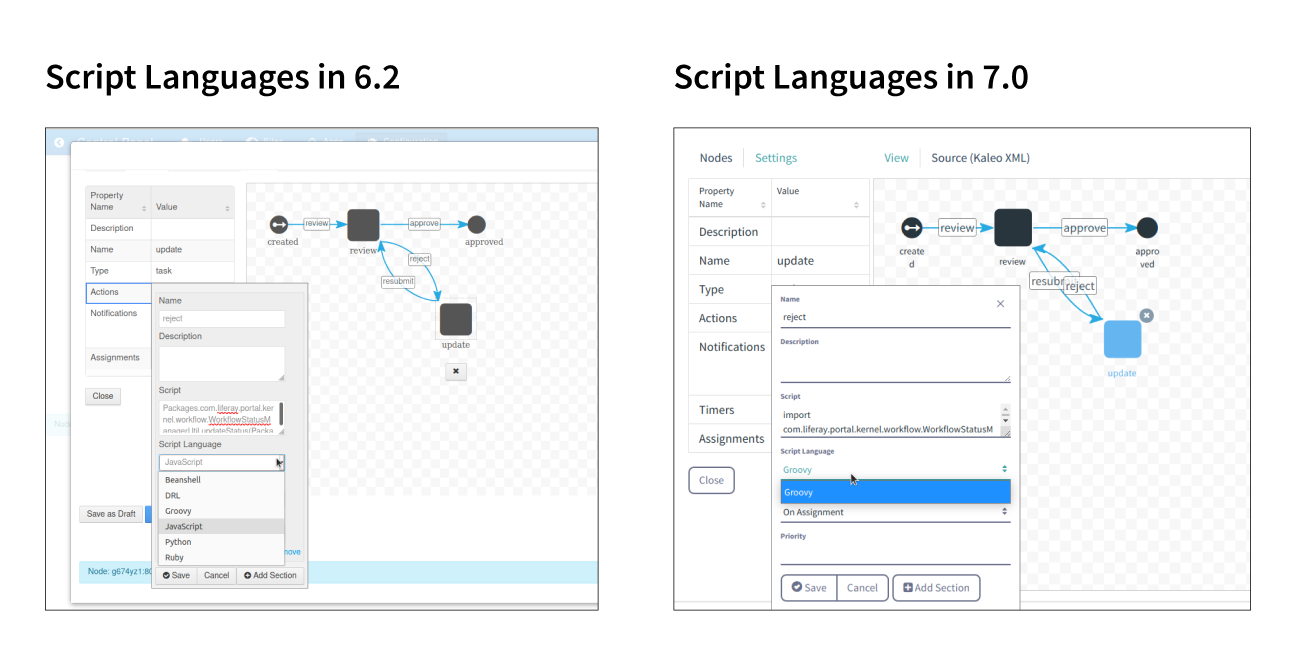
- When building a Kaleo Workflow definition in Liferay Portal, I was able to use different script languages. But in Liferay DXP, I see that I am only able to write a script using Groovy:
Environment
- Upgrading from Liferay Portal (6.2 and below) to Liferay DXP (7.0 and higher)
Resolution
- After the implementation of LPS-71924, which was released in 7.0 Fix Pack 14, the default script language was changed from Javascript to Groovy. All other languages were also removed.
- Please note that if you are upgrading from a lower environment or installing a patch with LPS-71924, the patch will not automatically change existing scripts in Kaleo Workflow, including the Single Approver Workflow. Administrators will need to update scripts to Groovy accordingly.
did-this-article-resolve-your-issue