Liferay Form Repeatable Field Issues
How To articles are not official guidelines or officially supported documentation. They are community-contributed content and may not always reflect the latest updates to Liferay DXP. We welcome your feedback to improve How To articles!
While we make every effort to ensure this Knowledge Base is accurate, it may not always reflect the most recent updates or official guidelines.We appreciate your understanding and encourage you to reach out with any feedback or concerns.
Legacy Article
You are viewing an article from our legacy "FastTrack"
publication program, made available for informational purposes. Articles
in this program were published without a requirement for independent
editing or verification and are provided"as is" without
guarantee.
Before using any information from this article, independently verify its
suitability for your situation and project.
Issue
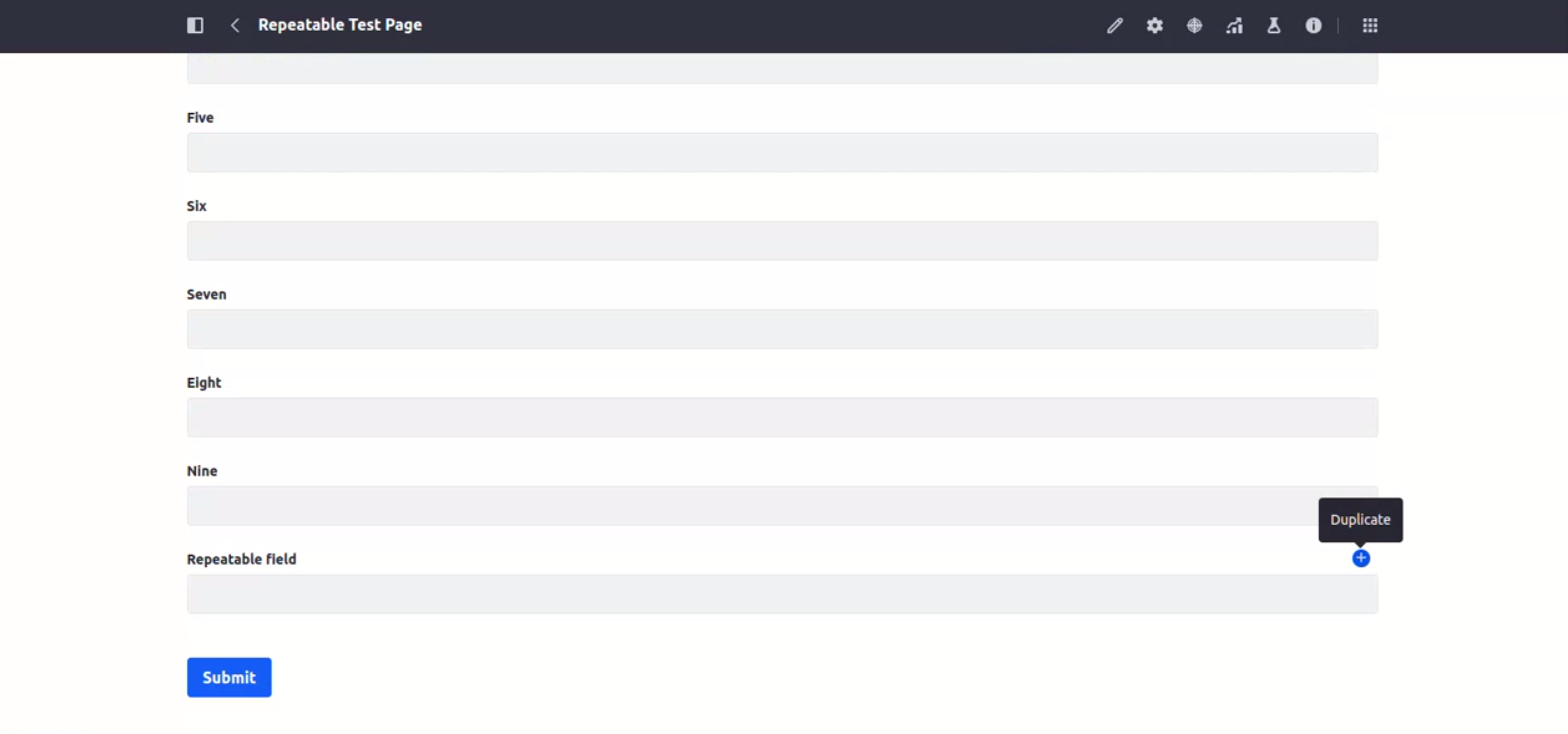
- When adding a field or multiple fields when using Liferay forms, the web page reverts to the top of the form instead of remaining on the newly added fields. In the image below, after selecting the "Duplicate" button, the expected behavior is that the view would remain on the next entry below "Repeatable Field"; the page will instead revert to the top of the "Repeatable Test Page".
Resolution
- This is a known behavior due to the wrong call of autofocus. A fix can be requested that includes LPS-177877.
Did this article resolve your issue ?