There are a few different types of statuses within the workflow of a support ticket in Help Center. Below is an overview of the 3 categories of statuses you will encounter on a ticket.
System Status
When you create a support ticket in Help Center, you will be asked for details on your System Status. The first value you will provide pertains to the environment:
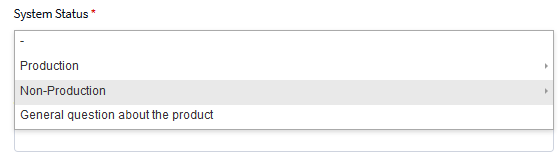
This will then prompt you to provide the status of the system in question:
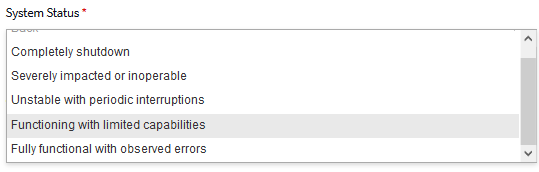
Note: In Help Center, a ticket will automatically be assigned a priority level based on the information you provided in the System Status field when creating the ticket.
Below is a chart that shows how the System Status corresponds to a priority level:
| Environment | System Status | Priority Level |
|
Production |
Completely Shutdown |
High |
|
Production |
Severely Impacted or Inoperable |
High |
|
Production |
Unstable with Periodic Interruptions |
Normal |
|
Production |
Functioning with Limited Capabilities |
Normal |
|
Production |
Fully Functional with Observed Errors |
Normal |
|
Non-Production |
Completely Shutdown |
Normal |
|
Non-Production |
Severely Impacted or Inoperable |
Normal |
|
Non- Production |
Unstable with Periodic Interruptions |
Normal |
|
Non-Production |
Functioning with Limited Capabilities |
Normal |
|
Non-Production |
Fully Functional with Observed Errors |
Low |
Once your ticket has been submitted, a Liferay Support team member will provide acknowledgement of receipt within 1 Business Day.
The System Status descriptions are based on the severity levels defined in the Enterprise Services Agreement Appendix (Note: High, Normal, Low in Help Center correspond to Critical, Major, Minor in the agreement). The severity level for a particular incident is a part of the ongoing discussion between you and Liferay Support, and may be adjusted as necessary.
Ticket Status
Once you’ve created a ticket, you will be able to easily track its progress by looking at its status.
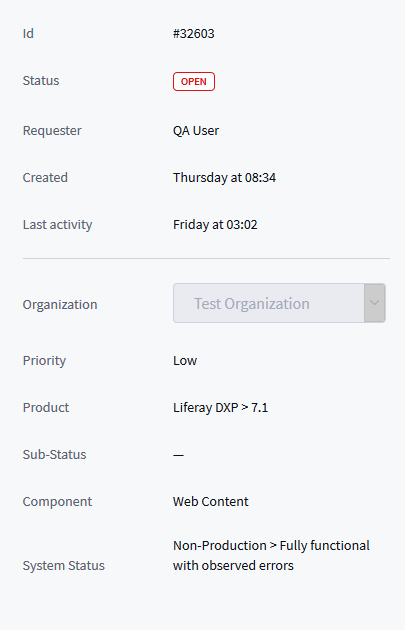
These are the different status labels for a ticket, and what they mean:
- Open -Your ticket has been assigned to a Customer Service Engineer (CSE) who is currently working on your ticket
- Awaiting Your Reply -Your CSE has requested additional information, or is waiting for a response from you on a proposed solution
- Solved -Your CSE has resolved the support issue
Note: Tickets with a Solved status will automatically be closed after 28 days without any comments. While closed tickets cannot be reopened, you can always create a follow-up ticket on the issue, if needed.
Sub-Status
There is also a Sub-Status field that your CSE will use while working on your ticket. This field gives more specific information on the current steps in-progress on an open ticket.
Here are the Sub-Statuses you might see on your ticket:
- Reproduced - Your issue has been successfully reproduced and verified by our Support Engineers
- Resolution Planning - A Technical Support Engineer is troubleshooting to determine the correct solution for the issue reported
- Solution Proposed - A solution has been provided and is pending confirmation from you whether it has resolved the issue or not
- Completed - A resolution for the reported issue has been delivered
- Inactive - We have requested additional information without response from your team
For any questions, please contact us at customer-service@liferay.com.