Legacy Knowledge Base
Published Sep. 10, 2025

Custom OSGi module needs to be redeployed after application server restart

Written By

Dia Seung

How To articles are not official guidelines or officially supported documentation. They are community-contributed content and may not always reflect the latest updates to Liferay DXP. We welcome your feedback to improve How To articles!

While we make every effort to ensure this Knowledge Base is accurate, it may not always reflect the most recent updates or official guidelines.We appreciate your understanding and encourage you to reach out with any feedback or concerns.

Legacy Article

You are viewing an article from our legacy "FastTrack" publication program, made available for informational purposes. Articles in this program were published without a requirement for independent editing or verification and are provided"as is" without guarantee.

Before using any information from this article, independently verify its suitability for your situation and project.

Issue

  • Custom OSGi module stops working and fails after an application server (i.e. Tomcat) restarts, and needs to be redeployed to get it to work again.

Environment

  • DXP 7.4

Resolution

  • Blacklist the OSGi components before restarting the server, using the following steps:
  1. In the Control Panel, navigate to Configuration  System Settings  Module Container. The Component Blacklist screen appears.

  2. In the Component Blacklist screen, add the names of components to disable, and click the Save button. The components disable immediately.
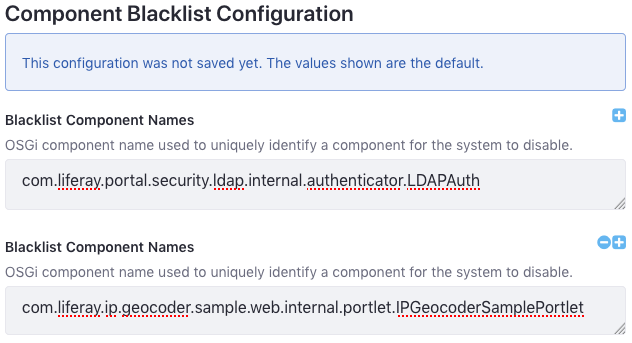
    This blacklist disables the components com.liferay.portal.security.ldap.internal.authenticator.LDAPAuth and com.liferay.ip.geocoder.sample.web.internal.portlet.IPGeocoderSamplePortlet.

  3. To export the blacklist, click on the Component Blacklist module’s Actions button (Actions) and then click Export. The blacklist configuration file then downloads (com.liferay.portal.component.blacklist.internal.ComponentBlacklistConfiguration.config). Here are contents of the file produced from the example list:

    blacklistComponentNames=["com.liferay.portal.security.ldap.internal.authenticator.LDAPAuth","com.liferay.ip.geocoder.sample.web.internal.portlet.IPGeocoderSamplePortlet "]
    
  4. Add the names of any components not already listed (e.g., components of modules not yet installed) that you want to prevent from enabling.

    Note: Configuration values can’t contain extra spaces. Extra spaces can short-circuit lists or invalidate the configuration entry.

  5. To deploy the configuration file, copy it into the folder [Liferay Home]/osgi/configs. The Liferay Home folder is typically the app server’s parent folder.

  6. Restart server

Additional Information


Did this article resolve your issue ?

Legacy Knowledge Base