This article documents an authentication error when attempting to log in to the portal instance using a google account. Listed below are the steps to resolve the issue or avoid it altogether.
Resolution
Error: redirect_uri_mismatch
Summary: After the user has been authenticated with Google, they are redirected to an authorized redirect URI. If there are no authorized redirect URIs listed, or if they do not match the request, the redirect_uri_mismatch error will display.
Common Causes
The redirect URI in the request does not match the ones authorized for the Open Authentication (OAuth) client.
Recommended Solution
- Navigate to the Credentials page in the Google API Console

- Select the appropriate OAuth 2.0 client ID.
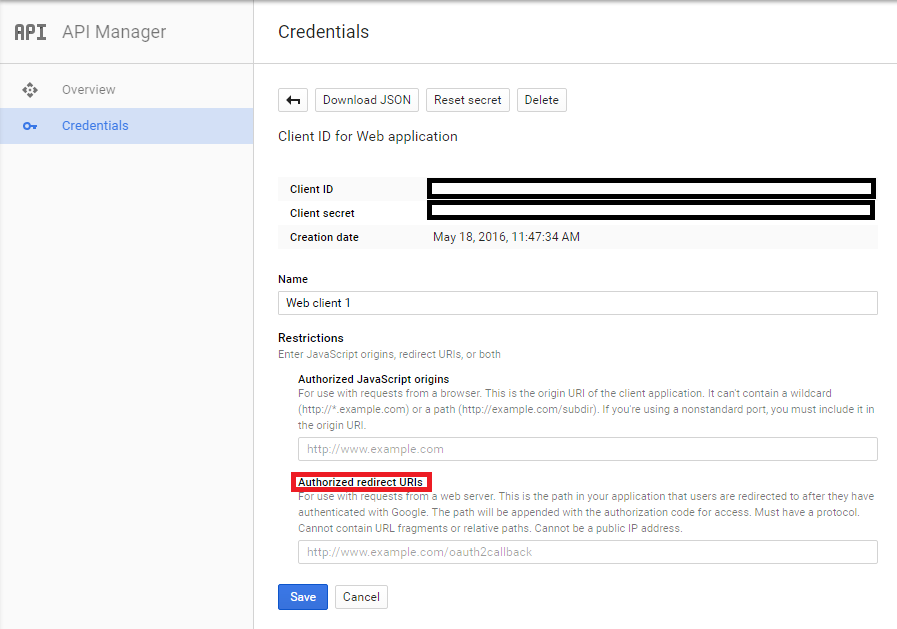
- Verify that the Authorized redirect URIs are correct.
- Save. Please note, it may take a few minutes to sync with the portal.
- Go back to the portal and sign in through Google to verify that everything is functioning correctly.

Prevention Tips:
When first completing the initial configuration in the Google API console, verify that all the steps listed in the Recommended Solution section are done correctly.
Additional Information
Client ID and Client Secret credentials can be created at Google APIs.