Issue with the custom friendly url of blogs

written-by
Rishabh Agrawal
How To articles are not official guidelines or officially supported documentation. They are community-contributed content and may not always reflect the latest updates to Liferay DXP. We welcome your feedback to improve How To articles!
While we make every effort to ensure this Knowledge Base is accurate, it may not always reflect the most recent updates or official guidelines.We appreciate your understanding and encourage you to reach out with any feedback or concerns.
legacy-article
learn-legacy-article-disclaimer-text
Issue
- The custom-friendly URL of the blog gets changed when it is published to Live from Staging.
Steps to reproduce:
1. Connect the Mysql or any database with Liferay DXP 7.1 fix-pack-dxp-15-7110.
2. Once connected, start the DXP instance.
3. From the left side panel, navigate to publishing->staging->select local live, enable only 'Blogs', and finally click save.
4. Again from the side panel, navigate to content->blogs and add a new blog.
5. Keep the title of the blog something like 'Welcome to liferay' and the custom URL as 'welcome-to-liferay-english' and then publish the blog.
6. Once the blog is published, go to the actions button and click the 'Publish to Live' option.
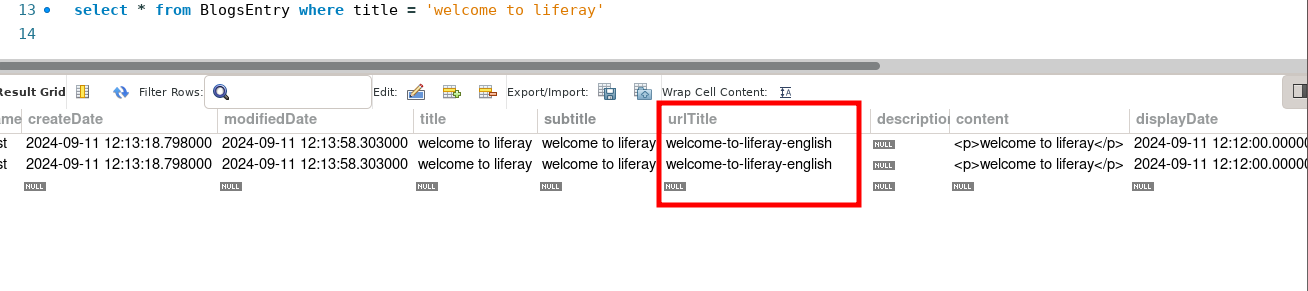
7. Now go to the database and type the SQL query select * from BlogsEntry where title = 'welcome to liferay'.
8. Check the value of the field 'urlTitle' from the output of the above-executed query. It is observed that the first row has the value 'welcome-to-liferay-english' and the second row has the value 'welcome to liferay'.
9. Similarly, perform the above steps with another language such as Hindi, and the value of the urlTitle is changed from custom to hyphen.
Actual Results: The value of urlTitle is getting changed from custom to blog title when checked from the database.

Expected Results: The urlTitle should not be changed when it is checked from the database.
Environment
- Liferay DXP 7.1 fix-pack-dxp-15
did-this-article-resolve-your-issue