legacy-knowledge-base
公開されました Sep. 10, 2025

カスタムOSGiモジュールは、アプリケーションサーバーの再起動後に再デプロイする必要があります。

written-by

Dia Seung

How To articles are not official guidelines or officially supported documentation. They are community-contributed content and may not always reflect the latest updates to Liferay DXP. We welcome your feedback to improve How To articles!

While we make every effort to ensure this Knowledge Base is accurate, it may not always reflect the most recent updates or official guidelines.We appreciate your understanding and encourage you to reach out with any feedback or concerns.

legacy-article

learn-legacy-article-disclaimer-text

問題

  • カスタムOSGiモジュールは、アプリケーションサーバー(つまり Tomcat)が再起動し、再び動作させるには再デプロイする必要がある。

環境

  • DXP 7.4

解像度

  • 以下の手順で、サーバーを再起動する前にOSGiコンポーネントをブラックリストに登録します:
  1. コントロールパネルで、 Configuration System Settings Module Containerに移動します。 [コンポーネントブラックリスト]画面が表示されます。

  2. Component Blacklist画面で、無効にするコンポーネント名を追加し、 Save ボタンをクリックします。 コンポーネントはすぐに無効になります。
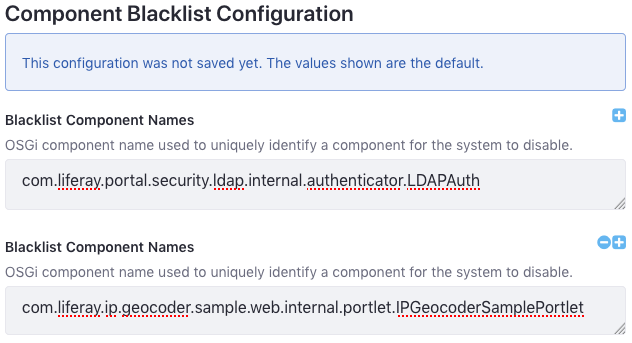
    このブラックリストは、コンポーネントcom.liferay.portal.security.ldap.internal.authenticator.LDAPAuthおよびcom.liferay.ip.geocoder.sample.web.internal.portlet.IPGeocoderSamplePortletを無効にします。

  3. ブラックリストをエクスポートするには、コンポーネント・ブラックリスト・モジュールのActionsボタン(Actions)をクリックし、 Exportをクリックします。 その後、ブラックリスト設定ファイルがダウンロードされる (com.liferay.portal.component.blacklist.internal.ComponentBlacklistConfiguration.config). サンプルのリストから作成されたファイルの内容は次のとおりです。

    blacklistComponentNames=["com.liferay.portal.security.ldap.internal.authenticator.LDAPAuth","com.liferay.ip.geocoder.sample.web.internal.portlet.IPGeocoderSamplePortlet "]
    
  4. まだリストにない有効にしたくないコンポーネント(たとえば、まだインストールされていないモジュールのコンポーネント)の名前を追加します。

    注:設定値に余分なスペースを含めることはできません。 余分なスペースがあると、リストが短絡したり、構成エントリが無効になったりする可能性があります。

  5. [Liferay Home]/osgi/configs. Liferay Home フォルダは通常、アプリサーバの親フォルダです。

  6. サーバーの再起動

追加情報

did-this-article-resolve-your-issue

legacy-knowledge-base