Favicon not showing on legacy Microsoft Edge

Written By
Alfonso Crisci
How To articles are not official guidelines or officially supported documentation. They are community-contributed content and may not always reflect the latest updates to Liferay DXP. We welcome your feedback to improve How To articles!
While we make every effort to ensure this Knowledge Base is accurate, it may not always reflect the most recent updates or official guidelines.We appreciate your understanding and encourage you to reach out with any feedback or concerns.
Legacy Article
You are viewing an article from our legacy "FastTrack"
publication program, made available for informational purposes. Articles
in this program were published without a requirement for independent
editing or verification and are provided"as is" without
guarantee.
Before using any information from this article, independently verify its
suitability for your situation and project.
Issue
- Liferay DXP is running locally on http://localhost:8080
- Liferay DXP favicon doesn't show up on Microsoft Edge legacy (EdgeHTML) v.18 or lower. Instead, a dummy favicon placeholder will be shown:
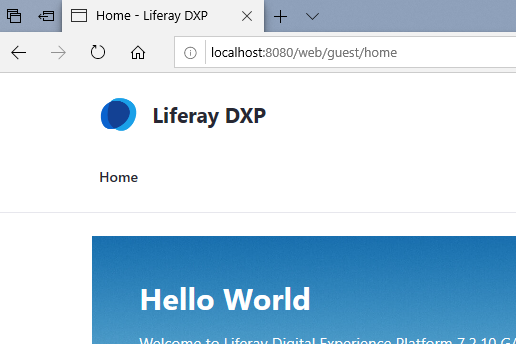
- On the same browser, the favicon will appear when reaching Liferay DXP through the machine's IP address (e.g. http://192.168.1.101).
Environment
- Liferay DXP 7.0+
- Microsoft Edge (EdgeHTML) v.18 or lower
Resolution
- Open the Power Shell as Admin
-
Run:
CheckNetIsolation LoopbackExempt -a -n="Microsoft.MicrosoftEdge_8wekyb3d8bbwe"
- Wait for the
OK. signal in the shell
- Close MS Edge and restart it
- Clear the MS Edge cache (CTRL+F5)
- Load http://localhost:8080
Did this article resolve your issue ?