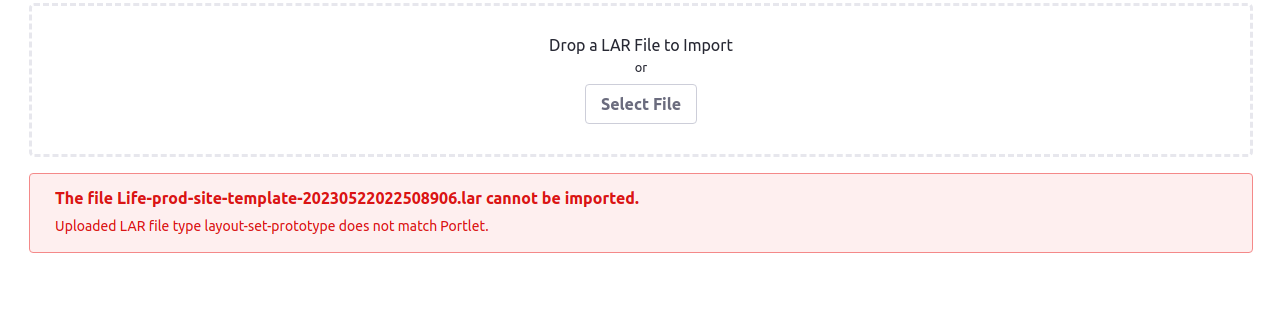
Error "Uploaded LAR file type layout-set-prototype does not match Portlet." reported when importing site template lar file
How To articles are not official guidelines or officially supported documentation. They are community-contributed content and may not always reflect the latest updates to Liferay DXP. We welcome your feedback to improve How To articles!
While we make every effort to ensure this Knowledge Base is accurate, it may not always reflect the most recent updates or official guidelines.We appreciate your understanding and encourage you to reach out with any feedback or concerns.
Legacy Article
You are viewing an article from our legacy "FastTrack"
publication program, made available for informational purposes. Articles
in this program were published without a requirement for independent
editing or verification and are provided"as is" without
guarantee.
Before using any information from this article, independently verify its
suitability for your situation and project.
Issue
- Go to Control Panel --> Site Templates
- Click the icon with three vertical points in the upper right corner of the page and click Export/Import
- Select Import section
- Then importing a site template lar file, the error "Uploaded LAR file type layout-set-prototype does not match Portlet." will display as below.
Resolution
Follow the steps below to resolve this error:
- Go to Control Panel --> Site Templates
- Create a new site template
- Open this new site template and go to Publishing --> Import
- Import the site template lar file
Did this article resolve your issue ?