Issue
- Duplicate error messages show up when resetting the password
-
Steps to reproduce:
1. Start and set up Liferay DXP 7.3 SP1 using the setup wizard. The email can be set as test@liferay.com and the password as a test.
2. Set up an SMTP client to listen to emails. For example: here, http://nilhcem.com/FakeSMTP/ is used
3. After Liferay is set up, click on sign in -> forgot password -> enter the email address and text verification to get a password reset link in the email.
4. Use the password reset link to reset the password. Enter the same password (for example test).
Observed Behavior: User will get an error "your password cannot be the same as the old password", and two "Your request failed to complete" error messages show up at the bottom left corner.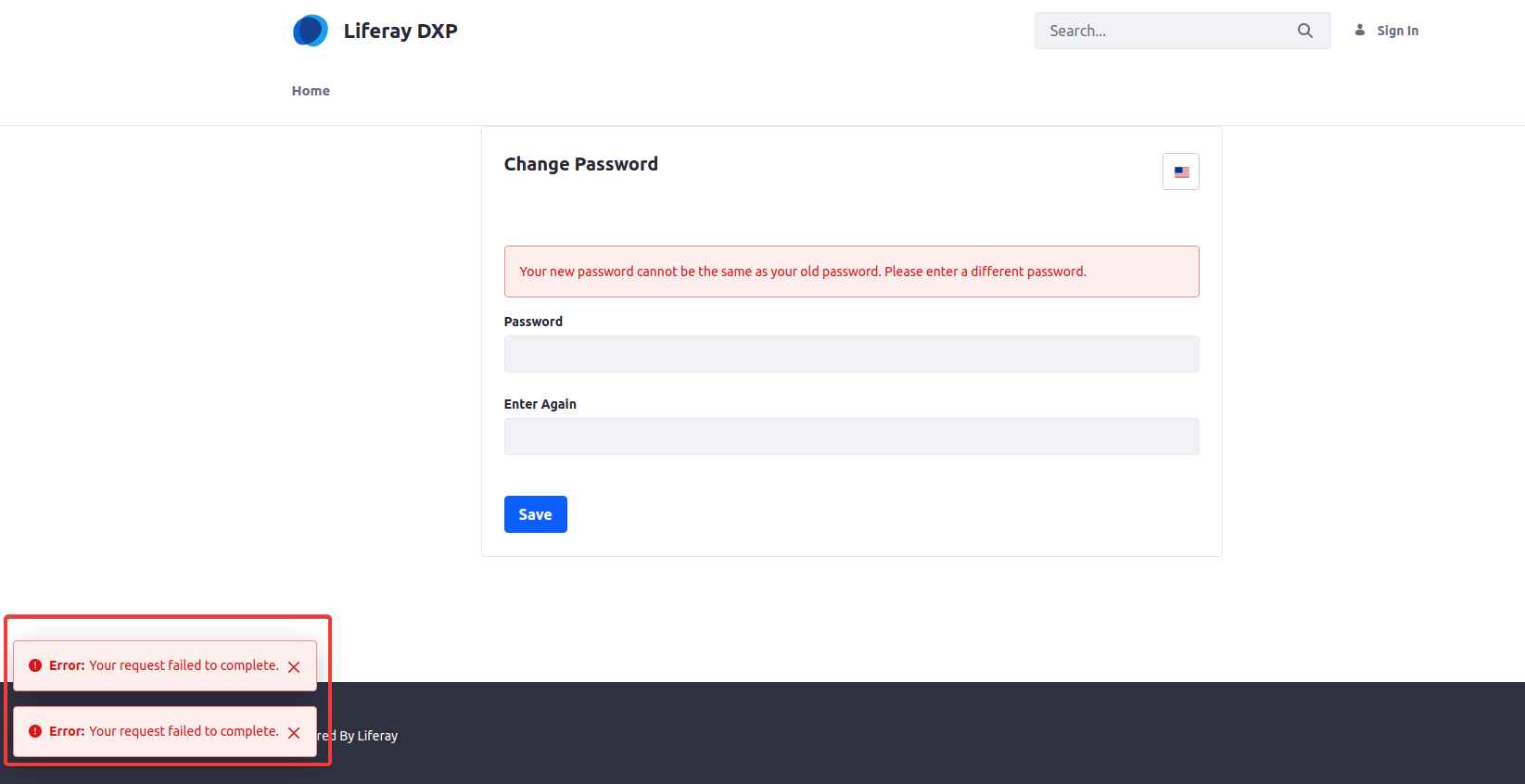
Expected Behavior: The "Your request failed to complete" error message should only show once, not multiple times.
Environment
- Liferay DXP 7.3 Fix Pack 1
Resolution
- The observed behavior is a known issue.
- If the hotfix is required for this issue, please create a support ticket requesting the hotfix by attaching the patch details.
- Installing Fix Packs and Hotfixes on Liferay DXP will guide you to install the Fixpack/Hotfix in your environment.
Additional Information
- LPS-132570
- Try the above activity in a lower environment first, if all works well, then move to the production environment as per your discretion.
- Perform these operations in application server downtime, because these steps require the restart of the server.